 EN
EN
 AR
AR
 BG
BG
 HR
HR
 CS
CS
 DA
DA
 NL
NL
 FI
FI
 FR
FR
 DE
DE
 EL
EL
 HI
HI
 IT
IT
 JA
JA
 KO
KO
 NO
NO
 PL
PL
 PT
PT
 RO
RO
 RU
RU
 ES
ES
 SV
SV
 CA
CA
 TL
TL
 IW
IW
 ID
ID
 LV
LV
 LT
LT
 SR
SR
 SK
SK
 SL
SL
 UK
UK
 VI
VI
 SQ
SQ
 ET
ET
 GL
GL
 HU
HU
 MT
MT
 TH
TH
 TR
TR

%20(1)/images/share.png)
When using comfort panel touch screen from HYST, you might face some troubles. These screens are good for control machines and systems, but sometimes they act tricky. If the screen don't respond good when you touch, or it do wrong things, you may need adjust it. Calibrating the screen help it know where you touching. This guide will show you how to fix common problems and some tips
Common Usage Issues with Comfort Panel Touch Screens and Solutions
One big issue people have is touch screen not responding to touch. This can be very annoying, specially when you trying make quick adjustments. First check if screen is clean because dust dirt or grease can stop it working well. Wipe it gentle with soft dry cloth. If still not work, try restart the device. Sometimes simple reboot fix small glitchs
Another problem is touch screen not accurate. You tap one place but it react different spot. This happen because screen need calibration. Go to settings menu and find calibration option. Follow what screen say. Usually you tap some points so it learn your touch
Sometimes problem come from software. Make sure your touch screen updated to latest version because old one can cause issues. Check HYST website for updates to install. If still don't work right, maybe hardware problem. Then contacting HYST support team can help alot. They got experts who guide you for complicated fix or see if need repair or replace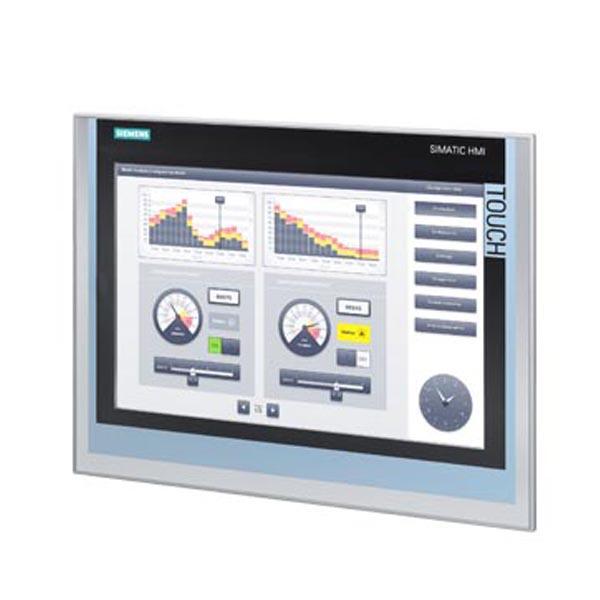
Where to Find Expert Tips on Comfort Panel Touch Screen Calibration
If you want more tips how calibrate your HYST comfort panel touch screen, start with manual that come with it. Manual usually got section for troubleshooting and calibration which very usefull. If you lost manual, no worry! HYST have online resource where you can get digital copy of manuals and guides
Also HYST customer support is great. They have team to answer questions and give advices. Don't hesitate call them if stuck. You can find forums online too where other users share what they experience and solutions. These can be goldmine cuz learn from others who had same issues
Video tutorials also fantastic to learn calibration. Many people post on YouTube step by step how adjust HYST screens. Watching make process more clear and easy understand. Seeing someone else do it help you feel confident handle screen yourself
With these resources you can understand better how care and calibrate your comfort panel touch screen. More you learn about device, easier troubleshoot and keep things run smooth. Remember HYST here to help, so use their support when need
What Wholesale Buyers Need to Know About Touch Screen Calibration
When buy touch screen devices like comfort panels for business, you want they work perfect. This where calibration come in. Calibration is adjusting so screen respond accurate to your touch. For wholesale buyers, know this process important. When get comfort panels from HYST, they should ready use but sometimes need little adjust. Calibration make sure when tap, it recognize exactly where pressed. Specially important for control machines or get important info
As wholesale buyer you should know different panels have different calibration way. Some need special software, others got built-in tool. Good idea read instructions come with HYST comfort panels. They guide how calibrate correct. If screen not respond well, time to calibrate. You might see touch one spot but react elsewhere which frustrating. Knowing calibrate can save time and keep customers happy
Also calibration can change depend on environment. For example if panel in very hot or cold place, might need calibrate more often. And if screen dirty it affect working so cleaning important. Keep screens clean and check calibration regular. This way HYST comfort panels always perform best and meet business needs
How to Troubleshoot Calibration Problems in Comfort Panel Touch Screens
Sometimes even after calibration touch screen still not work proper. If HYST comfort panel not respond as should, don't worry! Here some simple steps troubleshoot. First check screen clean. Dust dirt grease can make hard recognize touch. Use soft cloth wipe gentle. Don't use harsh chemical that damage it
Next if clean but still bad, try recalibrate. Follow instructions with your HYST panel. Usualy find calibration in settings. When start, follow each step careful. You need tap specific points help it learn touch
If recalibrate don't fix, check connections. Loose cables or bad connect can cause not respond correct. Make sure all cables plug secure. If not sure how, ask someone know electronics help
Lastly if nothing work, maybe deeper issue with panel. Then contact HYST customer support good idea. They give expert help and guide solve. Remember troubleshooting need patience so don't give up
Where to Source Quality Comfort Panel Touch Screens for Calibration
Finding good comfort panel touch screens very important for business. At HYST we offer high quality touch screens design to work well and easy calibrate. When look buy comfort panels, choose reliable supplier. Look for company with good reputation sell quality product. You want durable screens with accurate touch
One way find quality is read reviews from other buyers. See feedback on performance and how easy calibrate. This help make smart choice. Also see support company offer. HYST give excellent customer service so if question about calibration or troubleshoot you get help
Another tip compare prices but don't take cheapest. Sometime low price mean low quality. Better invest good comfort panel last longer work better. HYST offer good prices but ensure top products
Finally think warranty and return policy. Good warranty give peace mind if wrong you get help. By choose HYST for comfort panel touch screens you get quality products help business run smooth and efficient
Table of Contents
- Common Usage Issues with Comfort Panel Touch Screens and Solutions
- Where to Find Expert Tips on Comfort Panel Touch Screen Calibration
- What Wholesale Buyers Need to Know About Touch Screen Calibration
- How to Troubleshoot Calibration Problems in Comfort Panel Touch Screens
- Where to Source Quality Comfort Panel Touch Screens for Calibration